Free for every group
Shared expenses, with the working shown.
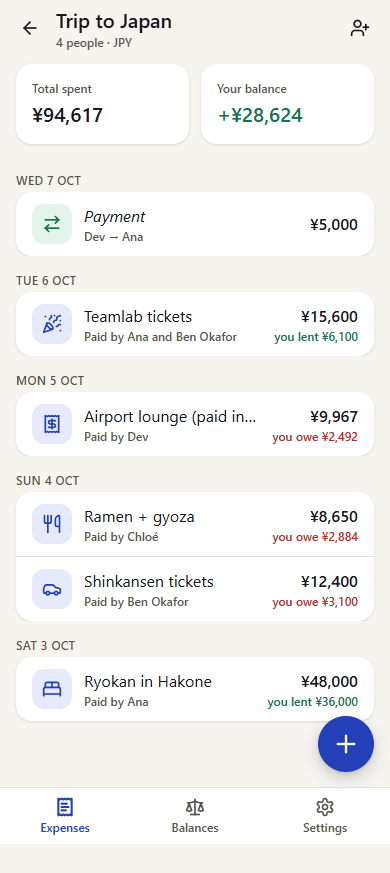
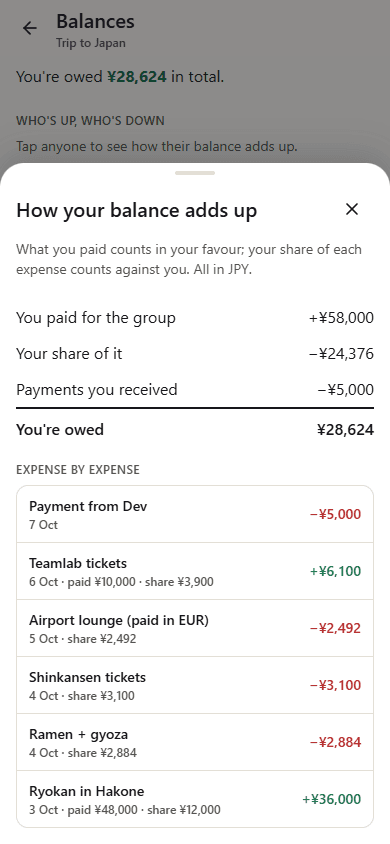
Make a group, share the link, and everyone adds what they paid. Tap anyone to see exactly how their balance adds up, expense by expense. No app to install, no accounts.
The trip was fun. The settling up wasn't.
“That can't be right.”
The app says you owe someone money, your own sums say something else, and there's no way to see how it got there. So someone rebuilds the whole trip in a spreadsheet.
“Download this, sign up, pay to see the second group.”
Half the group won't install another app. The other half hits a paywall the moment there's a second trip.
Try it: a weekend away
Three friends, three expenses. Tap anyone to see how their balance adds up, then mark the payments as paid. This is the same working every group gets.
How it works
Make a group
Name it, pick the currency, add who's in. No sign-up for anyone.
Share the link
Drop it in your group chat. Everyone opens it in their browser and picks their name.
Add what you paid
Amount, what it was for, save. Owesheet works out who owes whom, in as few payments as possible.
Plain numbers, nothing hidden
Every balance has its working
Tap anyone to see what they paid, their share of each expense and the payments made, adding up to exactly what they owe or are owed. Nobody has to redo it in a spreadsheet.
Download it all as a spreadsheet
Every expense with who paid it and each person's share, and totals that match the balances. Opens in Excel, Numbers or Google Sheets.
Free for every group, and everyone in it
No group limit, no paid tier to see a second group, no ads. Nobody you invite has to pay.
Nothing to install
It's a web page. Anyone with the link can join from any phone or laptop, without an account. Add it to your home screen if you like.
Fewest payments to settle
Balances turn into a short list of who pays whom. Mark one as paid, or record part of it.
Any split, any currency
Split equally, by exact amounts, by shares or by percent, with one payer or several. Spend in any currency at the rate you paid.
Works without signal
Groups you've opened still open offline. Add or change expenses with no connection and they're sent when you're back.
Rent and bills repeat by themselves
Set an expense to repeat weekly, monthly or yearly and the next one is added on the day.
Find anything, see every change
Search, filter and sort the expenses. Each one keeps a history of its edits, and the group has a list of recent changes.
Know when something changes
Turn on notifications to hear about new expenses and edits that involve you, or nudge everyone when it's time to settle up.
Mistakes are easy to undo
Delete an expense and undo it straight after. Two people editing the same one? The second is told, nothing is lost.
Print it or keep a PDF
A summary of the group, with every balance and who pays whom, ready to print or save as PDF.
Pricing
For every group
Free
Everything, for everyone in the group. No trial, no card.
- Unlimited groups and people
- Equal, exact, share and percent splits
- Several payers on one expense
- Any currency, converted to the group's
- Fewest-payment settle up
- Repeating expenses and notes
- Works offline, sends when you're back
- Spreadsheet download and printable summary
- No ads, no accounts
Questions
Is it really free?
Yes. Every feature on this page is free, for every group and everyone in it. There are no ads and nothing to unlock.
Does everyone need an account or the app?
No. Owesheet runs in the browser. Share the group's link or its 9-character code, and people pick their name from the list.
Who can see our group?
Anyone who has the group's link or code, so share it like a door key: with the people in the group, not in public. We don't run ads or analytics, and we never sell data.
What if someone gets it wrong?
Anyone in the group can edit or delete an expense, and a delete can be undone straight after. Balances update for everyone.
Does it work offline?
Yes, for the groups you've opened before. They open without signal, and you can add, edit or delete expenses and record payments. Those show as not sent yet, count in the balances straight away, and are sent once you're back online. Settings, joining and adding people need a connection.
Can I bring my groups over?
From Splid, yes: export the group to Excel there, then choose Import from Splid when you make a new group. The file is read on your device, and every person, expense and balance comes across to the cent. From anywhere else, start a fresh group.
One link for the whole group.
Set it up in a minute, share it in the chat, and settle up with the working on show.
Start a group, free